|
TIFF
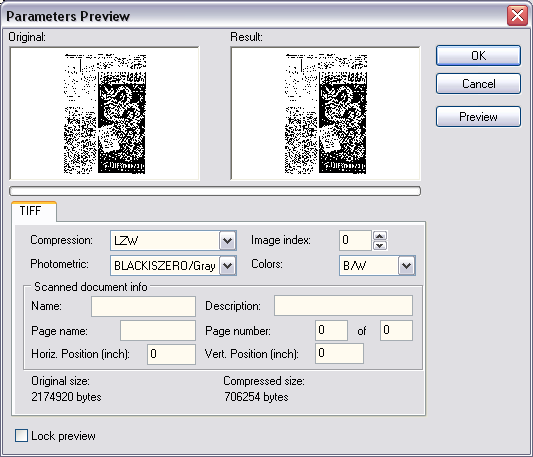
Compression. Specifies the compression
type for TIFF image format.
Image
index is the index (from 0) of the image.
Photometric. Photometric
interpretation.
Colors. Specifies the desired color
space.
Scanned
document info.
Name. Specifies the document name
field of a TIFF image format.
Description. Specifiy the image
description field of a TIFF image format.
Page
name. Page name field in a TIFF image format.
Page
number. Page number field in a TIFF image format.
Horiz.
Position. X top-left position of the original scanned
image.
Vert.
Position. Y top-left position of the original scanned
image.
JPEG
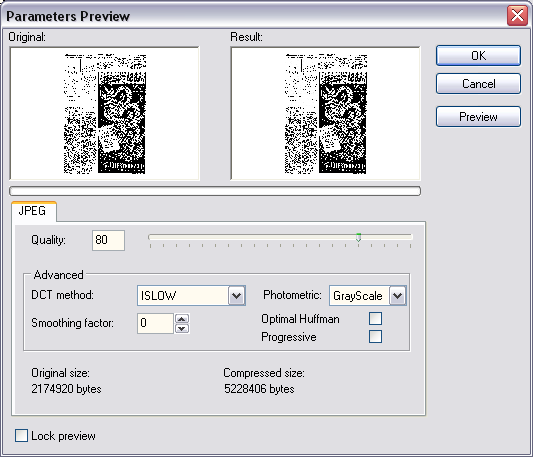
Quality. Quality factor, from 1 to
100. The higher the value, the better the image quality and the
larger resultant memory needed.
DCT
method. Specify the DCT
method.
Photometric. Photometric
interpretation.
Smoothing
factor. Smoothing factor (0 is none, 100 is max). If
JPEG_Smooth is not zero, the jpeg compressor smooth the image
before compress it. This improves compression.
Optimal
Huffman. If checked, specifies the Jpeg compressor to use an
optimal Huffman table (more compression). If unchecked, a
standard table is used.
Progressive. Specifies if this is a
progressive jpeg.
PRINT
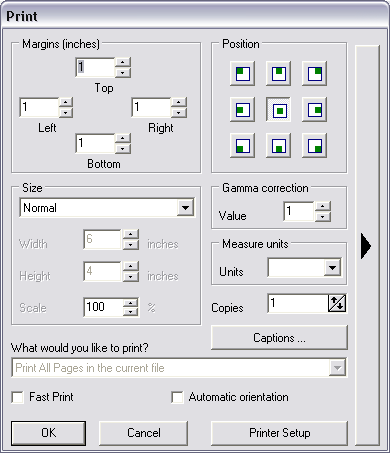
From here the user can select the options
they wish to use to print the current file.
Following that is a series of check boxes
providing several printing options.
They are:
Normal - print the image without any
scaling factors
Fit to
page - Scales the image to fit the page
Stretch to
Page - Stretches the image to fill the page
Specified
Size : specify absolute sizes with the Width and Height
parameters
Specified
Scale : specify the Scale of sizes
Print all
pages - Check this box to Print all of the pages in the
file
Fast
Print - fast but with low quality.
Automatic
orientation - can detect optimal orientation.
|


